
SaaS blogs
A SaaS blog needs regular articles about the problem your product solves. Unspar researches each topic on the web and writes the article with the product facts you give it.
All docs pages
A SaaS company blog usually carries two kinds of posts: how-tos that help people with the task your product is for, and comparisons that help them choose between tools. Unspar writes both. It looks up each topic on the web, writes for the readers you describe, and sends the finished article to your blog. You set this up once in a project, which represents one website in Unspar with its own settings and articles.
Set up a project for your blog
Unspar only knows what you tell it about your product, since it can’t log in to your app or read help pages behind a login.
- Open Projects and choose New project.
- Enter your blog’s address and choose Create project. Unspar reads the home page and suggests the language.
- In the project’s More actions menu (⋮), choose Edit.
- Write a few sentences into Site context and choose Save.
A site context for a SaaS blog could look like this:
Articles for people who run a small online store and manage their own stock. Our product is an inventory tool for these stores. Mention it only where it helps with the task in the article. Prices are in US dollars.
Put your readers and any limits first, because the research step only reads about the first 700 characters. See Projects and site context.
If an article needs details about a specific feature, add them to Additional context under More options on the Create page. You can also add a public help page under Source links. Including one or two links keeps an ordinary article at 1 credit, while three or more make it In-depth, at 4 credits. See Research, sources and citations.
Pick the template
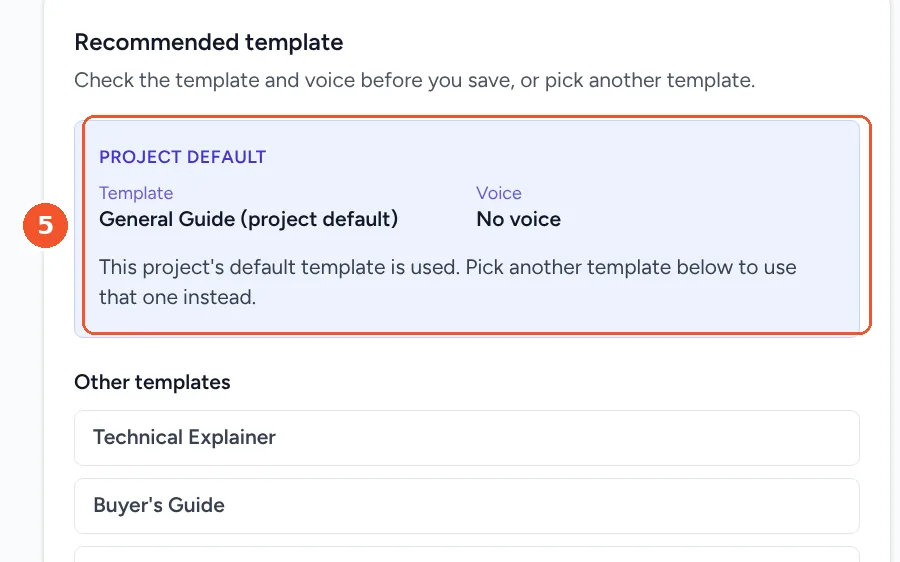
A template is the blueprint for a specific kind of article. It controls how much research Unspar runs and whether sources show up as links. Three built-in templates work well for a SaaS blog.
| Kind of post | Template | Credits |
|---|---|---|
| How-to | General Guide, the default | 1 |
| Technical topic | Technical Explainer, with sources linked | 1 |
| Tool comparison | Buyer’s Guide | 1 |
When you type a comparison topic on the Create page, Unspar offers Buyer’s Guide under Other templates. It compares tools by what they do and isn’t made for price comparisons. Tick Check the facts on comparisons, since competing tools change their features often. That check adds 1 credit to an ordinary article. See Choosing a template.
Keep articles in your voice
A voice sets the tone of your articles, and Unspar can build one from the posts already on your blog.
- On the project page, find the card Your site voice and choose Find site articles (free).
- Choose Create your site voice (free). It needs at least 2,000 words from your site.
- Read the sample. When you like it, choose Use as project default.
From then on, new articles will use that voice. Your team’s first site voice is free, and each additional one costs 5 credits. See Voices.
Find topics
An idea run suggests topics your blog hasn’t covered yet. Open Ideas, choose New run, enter your blog’s address, and choose Generate ideas. Unspar reads up to 50 pages of your site for 1 credit per run. When you spot an idea you like, choose Queue article. See Project Auto and ideas.
Publish to your blog
An outlet is a site Unspar publishes to. Open Outlets, choose New outlet, enter your blog’s address under Website URL or domain, and choose Detect. Fill in the fields under Connection and choose Create outlet. Next, select it as your project’s Default outlet under Publishing automation on the Edit page.
WordPress receives the text, images, and an excerpt. Ghost receives the title and text without images, and the post goes live as soon as Unspar sends it, so pick the day in Unspar’s Publish dialog. See Outlets and publishing.
What it costs
Two posts a week come to about eight articles a month.
| Each month | Credits |
|---|---|
| 6 how-tos and technical posts | 6 |
| 2 comparisons with Check the facts | 4 |
| 1 idea run | 1 |
| Total | 11 |
Starter costs €49 a month and includes 50 credits. Unused credits roll over, up to 150. See Credits and prices and the pricing page.
Last updated 25 November 2026. This page as Markdown: saas-blogs.md
Try Unspar for free
Create a project, give it a topic and read the article before anything goes live.