
Many similar pages
Some sites need one page for each item on a list, like each product you sell. Unspar writes one article per row of your list and researches each one on its own.
All docs pages
Some sites need a separate page for every item on a list, like a care guide for each material or an answer for each common question. Unspar takes that list as a batch and writes one article per row, doing separate research for each one. If you switch review on, every article waits for your approval before it goes to your site.
When does a list work?
A list works well when each row has its own distinct answer. If the only difference between rows is a single detail, like the name of a town, the pages end up saying the same thing.
Set up the project before the list
A project is one website in Unspar, with its own settings and articles. Unspar reads the project’s Site context before writing each article in the list, so fill that in first. See Projects and site context.
The default template, General Guide, fits most lists. Because a batch has no voice field, pick a Writing voice in the project settings now if you want the pages to sound a certain way.
Connect your site as an outlet under Outlets. An outlet is a site Unspar publishes to. See WordPress.
Then open the project’s Edit page and go to Publishing automation:
- Pick the outlet as Default outlet.
- Switch on Auto-publish completed articles.
- Leave Require human review before auto-publish on.
- Under Publishing schedule, choose Daily at 08:00.
- Choose Save.
Auto-publish only picks up articles that finish while the setting is on, so set this up before you start the list. See Scheduling and auto-publish.
Start the list
A batch holds up to 1,000 rows. You can paste one topic per line, or upload a CSV file (a spreadsheet saved as plain text) to give each row more detail:
title_or_topic,additional_context,keep_title_verbatim
How to clean and care for a slate floor,We seal slate before we fit it.,true
How to clean and care for an oak floor,Our oak floors come oiled or lacquered.,true
additional_context gives background for a single article, and keep_title_verbatim tells Unspar to use your exact title. Leave out scheduled_at. Any row with a publish date counts as already approved, which means you won’t be able to ask for changes later.
- Open the Create page, choose the Batch tab and then Create new articles.
- Pick the project, and Project defaults as the Template. Set the Outlet.
- Paste the topics under Rows, or choose Upload CSV and pick the file.
- Choose Parse and review. Check the Estimate of each row, and look at rows marked Possible duplicates.
- Choose Save & queue selected.
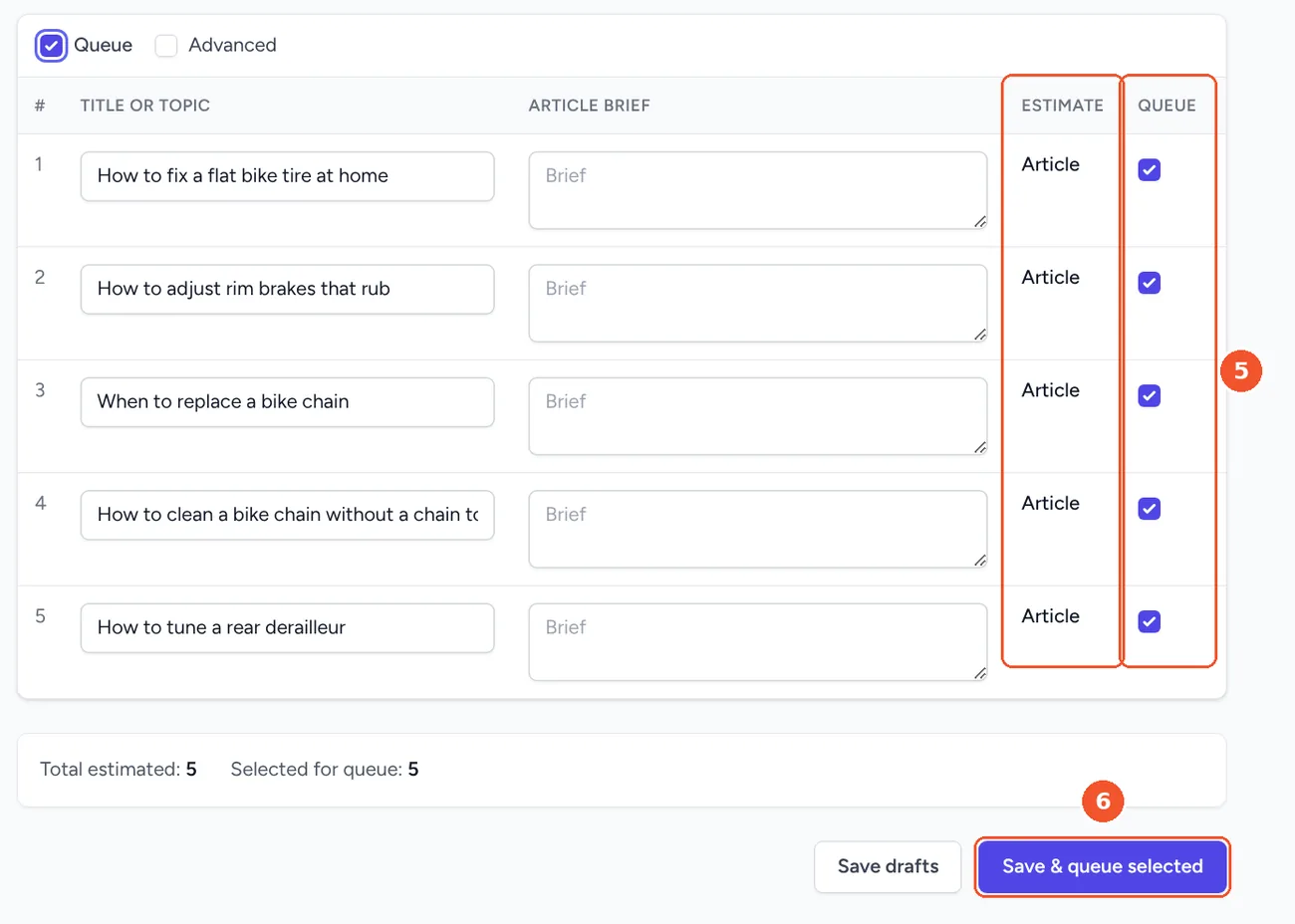
The selected rows enter the queue and start running as writing slots open up. See Create an article.
Read each article before it goes live
Once an article finishes, its page shows “Waiting for approval”. If something looks off, choose Request changes and explain what needs fixing. The first round is free.
When you’re happy with the draft, choose Approve for auto-publish. Approved articles publish one per day at 08:00. You can’t undo an approval, and there is no button to approve multiple articles at once.
What it costs
Each row costs the same as a standalone article. A standard article costs 1 credit, so a list of 18 rows costs 18 credits.
When you queue a batch, Unspar reserves the credits for all selected rows at once. If the total exceeds your balance, the review screen tells you and Save & queue selected stays grayed out. Uncheck Queue on some rows, or choose Save drafts and queue the rest later.
Starter has 50 credits a month for €49, and Pro has 250 for €199. See Credits and prices and Buy credits.
What can’t a batch do?
A batch has no fields for research or for your own source files, and you can’t turn on fact-checking. If a row needs those options, run it through the Create page one by one.
Possible duplicates doesn’t flag two rows that ask nearly the same question.
Unspar only links a new article to related posts that are already live, so articles in the same batch don’t link to each other. If you want links between them, split the list into two or three parts and let the first batch go live before you start the next.
Last updated 25 November 2026. This page as Markdown: programmatic-pages.md
Try Unspar for free
Create a project, give it a topic and read the article before anything goes live.