
Affiliate and niche sites
A niche site needs many researched articles on one topic. Unspar writes them from a list of ideas, or on its own each day, and each article can wait for your approval.
All docs pages
A niche site runs on buying guides and how-tos about a single topic. Project Auto, the part of Unspar that writes on its own, can start a set number of articles each day. The posts arrive in WordPress unpublished, and you add your affiliate links there.
Set up a project for your site
A project is one website in Unspar, with its own settings and articles. Its language variant decides which region web searches use, so pick English (US) for a US site.
- Open Projects and choose New project.
- Enter your site’s address and choose Create project. The new project opens.
- In the project’s More actions menu (⋮), choose Edit.
- Write the Site context and choose Save.
Unspar doesn’t use the products it writes about. Say so in the site context, like this:
Guides for people in the US who are choosing gear for home coffee brewing. Prices are in US dollars. Articles compare products by their features and never say that we tested a product ourselves.
Pick the template
A template sets the structure for a specific kind of article. Three built-in templates fit a niche site:
- Use Buyer’s Guide for buying guides. It explains what to look for and weighs the options, using one web search and no source links.
- Use General Guide (the default) for how-tos and troubleshooting. It runs up to five web searches.
- Use Technical Explainer for background articles. It includes links to its sources.
None of the built-in templates are meant for roundups of named products with prices, and Buyer’s Guide isn’t meant for hands-on reviews. See Choosing a template.
Product specs change often, so turn on Check the facts on the Create page when you create a buying guide. It adds 1 credit to an ordinary article. See Research, sources and citations.
Add your affiliate links in WordPress
An outlet is a site Unspar publishes to. Unspar doesn’t add affiliate links or a disclosure line. Connect your site under Outlets and set the outlet’s Default status to Draft. Each post then waits in WordPress, so you can add your links before you publish it there.
Once a post is sent to WordPress, Unspar treats it as published, and you can’t request changes in Unspar anymore. Make any edits in Unspar first. See WordPress.
Find topics
Project Auto pulls its topics from your project’s ideas list. Open Ideas, choose New run, enter your site’s address, and choose Generate ideas. For 1 credit a run, Unspar reads up to 50 pages on your site and suggests articles you don’t have yet. If you don’t want Auto to write a topic, choose Hide idea in that idea’s menu.
Let Project Auto write the how-tos
Auto needs to know what to do with a finished article, so set up publishing with approval first.
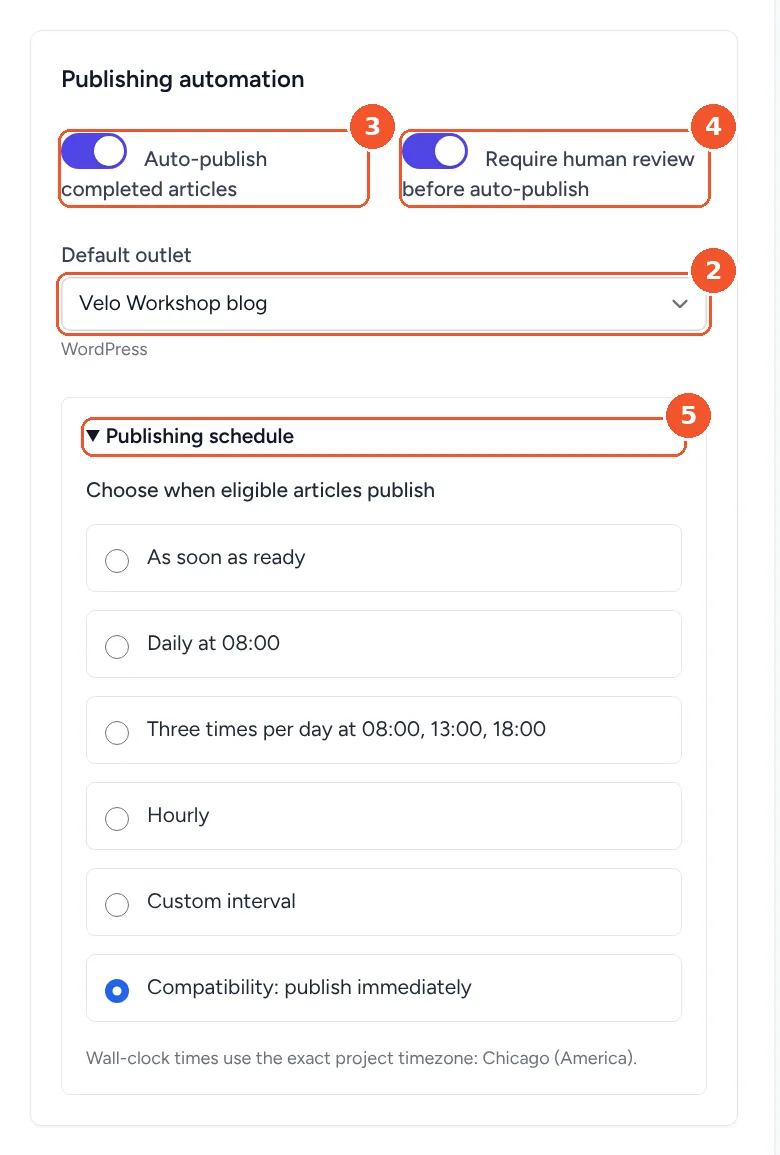
- On the project’s Edit page, under Publishing automation, pick your WordPress outlet as Default outlet.
- Switch on Auto-publish completed articles. Leave Require human review before auto-publish on.
- Under Publishing schedule, choose Daily at 08:00 and then Save.
- On the project page, choose Turn on Auto in the Auto panel.
- Pick General Guide as Template, set Articles/day to 1 and choose Save Auto.
Each day, Auto picks the next idea on the list and skips anything your project already covers. When the list runs out, Auto starts a new idea run on its own for 1 credit.
Finished articles wait with the status “Waiting for approval”. Choose Approve for auto-publish to send an article out at the next open 08:00 slot. Once you approve an article, you can’t undo it. See Project Auto and ideas and Scheduling and auto-publish.
Because Auto uses a single template for every article and has no fact-check setting, start your buying guides yourself on the Create page.
What it costs
One how-to a day plus two buying guides a week come to this:
| Each month | Credits |
|---|---|
| 30 how-tos from Project Auto | 30 |
| About 8 idea runs that Auto starts | 8 |
| 8 buying guides with Check the facts | 16 |
| Total | about 54 |
Images add 1 credit each. Pro costs €199 a month with 250 credits, which leaves room for images. Starter’s 50 credits aren’t enough, but Starter plus a 100-credit pack gives you 150 credits for €148. See Credits and prices and Buy credits.
Last updated 25 November 2026. This page as Markdown: affiliate-sites.md
Try Unspar for free
Create a project, give it a topic and read the article before anything goes live.