Skip to content

End-to-end AI content production

Content that doesn't read like AI.

Unspar researches your topic, writes in your voice, and edits each draft until it's ready to publish. Auto-publish to your blog or CMS, or review the draft first. Built for teams that publish content every week.

Blog articles

Articles for your company blog

White papers

Longer buyer-facing documents

Social posts

LinkedIn and short-form content

SEO pages

Pages shaped around search intent

Refreshes

Update and improve existing pages
Unspar creating content

Step 1 of 6

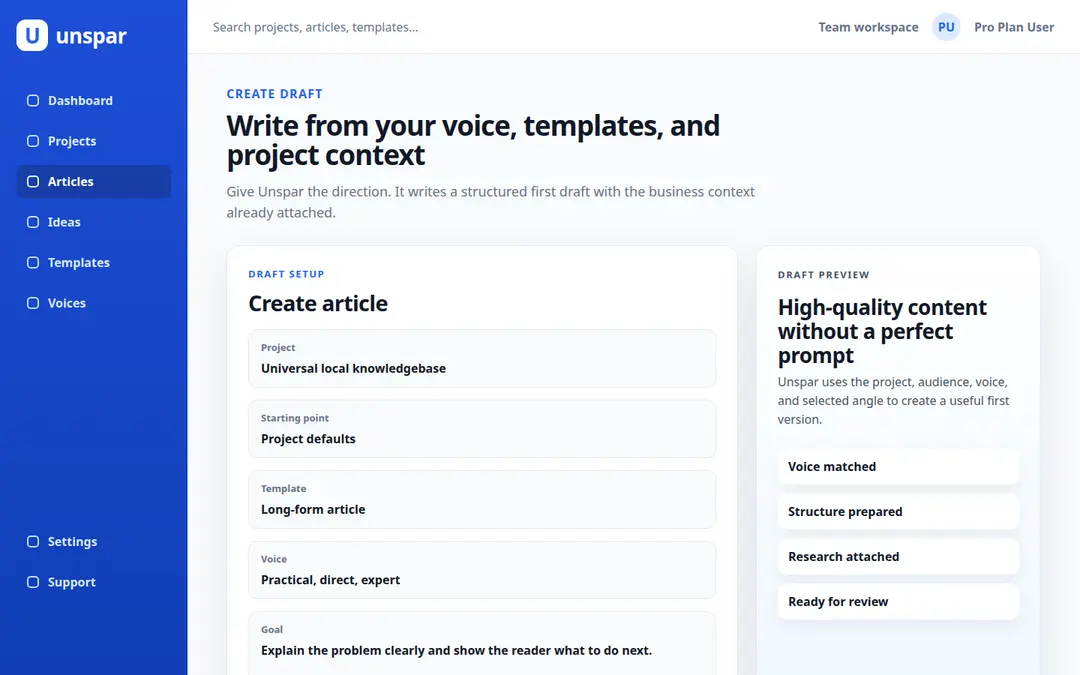
Create Draft in the app

Start with project, starting point, title or topic, article brief, language, and outlet. Advanced settings can stay hidden until needed.

What makes the output different

Why Unspar drafts don't read like AI

Most AI writing tools one-shot a prompt and hand back the draft. Unspar treats each piece as an editorial process: research, structure, voice, and a humanization pass before the draft ever reaches you.

Real research with citations

For research-heavy work, Unspar searches relevant sources, studies supporting pages, and prepares citations before drafting. Claims that need support get linked back to where the support lives, so reviewers can verify rather than guess.

Step-by-step editorial workflow

Setup is resolved, sources are gathered, the draft is built around an outline, then refinement passes improve clarity, flow, and structure. The draft you read has already been edited several times before it reaches your inbox.

Humanization pass on every draft

A dedicated pass rewrites stiff sentences, breaks up template-shaped paragraphs, and applies your saved voice. The patterns most readers recognize as “AI-written” get cleaned up before the draft ever lands in your queue.

How it works

The content tool that already knows your business

Set up your project once with your site, audience, products, voice, and outlets. From then on, every draft starts from the business it’s for, not a blank prompt.

Title, brief, or question

Start with a title if you have one, or write a short brief in plain language.

Drafts the article

Builds the structure, writes the piece, and applies the selected language and format.

Applies a voice

Use a built-in voice or a team voice saved from your own writing samples.

Publish or download

Completed articles can be reviewed, downloaded, or sent to a configured outlet.

Give it a topic. Get a draft to review.

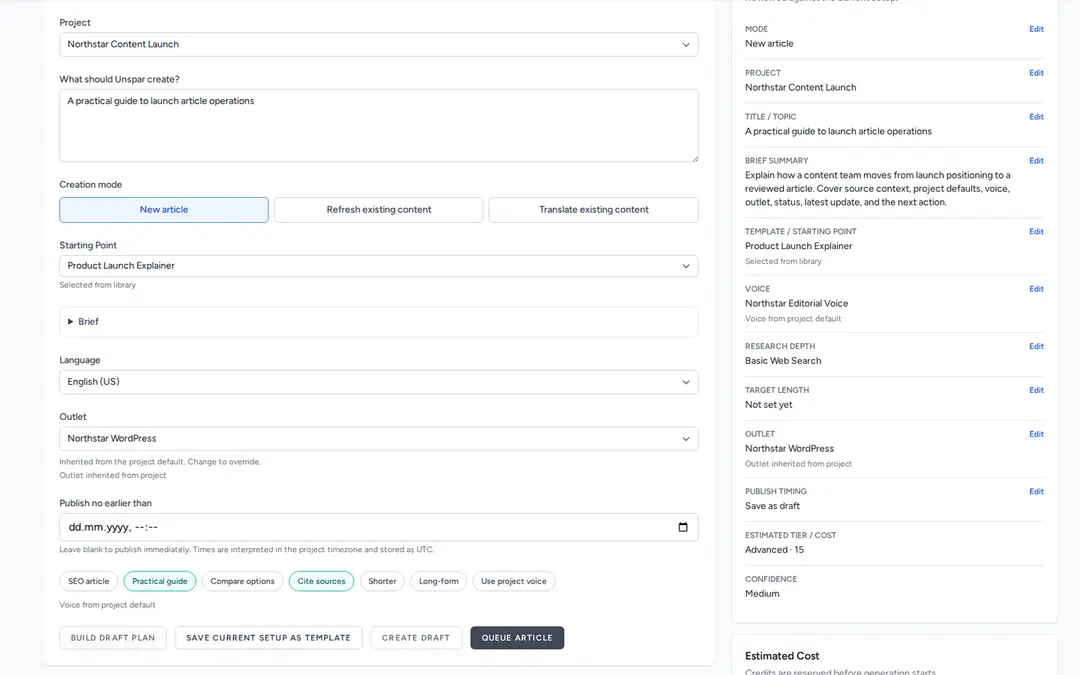
Start from a rough title, a customer question, source notes, or a complete brief. Unspar keeps the first screen short, then lets you open the full article setup when you need tighter control.

Unspar title and article brief fields
1

Enter title or brief

Write a title, paste source notes, or describe what the piece should cover. Keep the title exact only when the final H1 must match.

Unspar project, starting point, language, and outlet fields
2

Pick the setup

Choose the project, starting point, language, and outlet. Project defaults and templates fill the sensible settings first.

Unspar advanced article settings
3

Adjust details if needed

Set article type, intent, voice, length guidance, research depth, outline, audience, and refinement options.

Unspar cost estimate and create draft buttons
4

Save draft or queue

Review the estimate, save a draft for review, or start generation right away from the same screen.

Content formats

Create the content your site needs

Start from the same business context, then choose the format that fits the page, campaign, or channel.

Blog

Blog articles

Company blog content for product topics, customer questions, explainers, and search-led ideas.

Draft type
Article draft
Typical use
Website traffic

Long-form

White papers

More substantial pieces for buyers, experts, internal teams, and longer decision processes.

Draft type
White paper
Typical use
Buyer education

Social

Social posts

LinkedIn and short-form posts that can reuse the same context behind your longer content.

Draft type
Post set
Typical use
Distribution

Search

SEO pages

Service, product, comparison, and answer pages shaped around a clear search intent.

Draft type
SEO page
Typical use
Search demand

Refreshes

Update existing pages without starting over

Hand Unspar an existing page or draft to improve the angle, structure, freshness, and business relevance, with new research and stronger source support where it matters.

Refresh a page

From idea to publishable draft, without the blank page

Use your own topic when you have one, or let Unspar surface article starts from your site, audience, competitors, products, and goals. It suggests what is worth writing next, helps you find a specific angle, and carries the selected idea straight into a draft. No rebuilding the brief from scratch.

Get proactive suggestions

Unspar surfaces article starts from your business context and keeps a fresh list ready to review.

Read the FAQ

Find specific angles

Ask for ideas around a product, audience, competitor, keyword, or goal and get concrete article angles.

Turn an idea into a draft

Choose an idea and its title, angle, and context move into article creation.

Start publishing
Unspar content ideas

What you get back

Review is optional. The draft is publish-ready.

Most AI content needs editing before you can use it. Unspar runs research, structure, voice, and humanization passes before the draft is finished, so the result is ready to publish without changes. Auto-publish to your outlet, or review and edit if you want to.

Sourced where it counts

Claims that need support link back to the source pages. The evidence is verifiable, not invented by the model.

Voiced throughout

Your saved voice runs through every section. The humanization pass cleans up wording and structure readers usually recognize as AI-generated.

1. Input

Bring what you have

A topic, title, customer question, product note, source, or saved idea is enough to begin.

2. Setup

Project context fills in the rest

Your audience, voice, products, and outlets are already loaded. The brief stays short because the business is already in the system.

3. Work

The editorial pipeline runs

Research, structure, drafting, voice, and humanization passes happen in sequence. The draft is revised several times before it's ready for review.

4. Output

Auto-publish, or review first

Unspar can auto-publish the draft to your outlet. Or review, edit, download, and publish yourself.

Quality workflow

Five passes happen before you read the draft

Most AI tools one-shot a prompt and hand back the result. Unspar runs setup, research, drafting, refinement, and finishing as separate editorial steps, with the model focused on one job at a time. The result reads more like an editor's pass than a raw first attempt.

1

Resolve the setup

Project, outlet, audience, language, title handling, voice, length, and starting point are resolved before writing begins.

2

Research and source grounding

When the settings call for depth, Unspar studies source material, project context, supporting pages, and search results, then prepares citations for claims that need support.

3

Draft with structure

The draft is built around the chosen format, intent, outline, and source notes instead of starting from a loose prompt and hoping the shape is right.

4

Refine the writing

Editorial passes improve clarity, flow, voice, and readability. Drafts can be simplified, made more natural, aligned to a saved voice, or tightened before delivery.

5

Add the useful extras

Depending on the piece, Unspar adds citations, FAQs, executive summaries, section improvements, or other finishing blocks that make the draft easier to review and publish.

Configurable depth

A quick social post and a source-backed report do not run the same workload. The settings you pick control how much research, refinement, and structure each run gets.

Business-specific output

Project context, saved voices, audience notes, sources, and outlet settings keep the draft tied to the company it's written for, not to a generic template.

Tracked from start to publish

Every draft carries its status, outlet, owner, source context, and next action. Nothing falls into a chat history or a forgotten doc.

Why ChatGPT content always reads like AI

ChatGPT works fine for one-off help, but brand content keeps hitting the same three problems.

The pain

It reads like AI

Anyone reading it can tell. The same sentence rhythms, template-shaped paragraphs, and phrasings appear across every chat session, no matter what you prompt. Readers spot it in two paragraphs.

In Unspar

A dedicated humanization pass rewrites stiff sentences, breaks up template paragraphs, and applies your saved voice. The patterns readers recognize as AI get cleaned up before the draft lands in your queue.

The pain

Hallucinations and made-up facts

ChatGPT confidently invents stats, sources, and quotes that don’t exist. You either spend an hour fact-checking, or you publish something that’s flat wrong and your readers catch it before you do.

In Unspar

Research comes before drafting. Sources are reviewed, citations are prepared, and claims that need support are linked to source pages.

The pain

Recycled ideas that turn up everywhere

Ask ChatGPT for ten article ideas and you get the same generic angles every other site has already published. The model pulls from the internet instead of your business, so what comes back is bland and uncreative.

In Unspar

Idea generation runs against your specific business: your site, your audience, your competitors, your products, and your goals. The angles surface from your situation, not from the internet average.

These are the three problems Unspar is built to solve.

Start publishing
Unspar templates screen

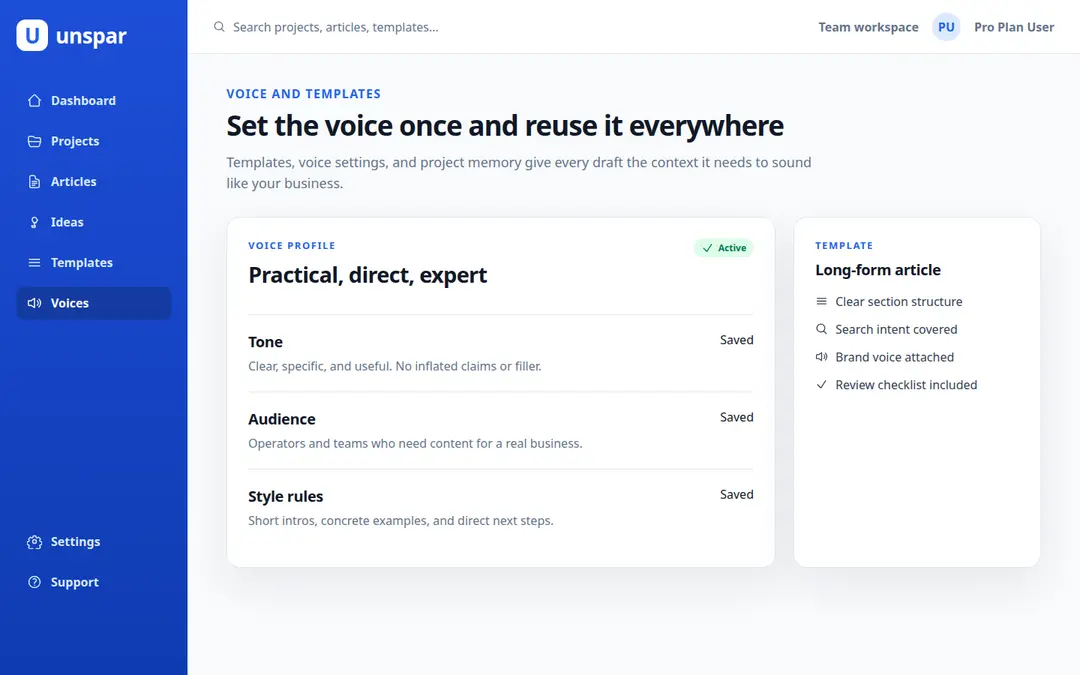
Save the article setup once, reuse it forever

Instead of rebuilding the same article type, structure, target length, and research settings for every draft, save the setup as a template. Picking the template later loads everything in one click.

Voices that carry through the whole draft

Save voices for your team, brand, or customer segment. Pick a practical product voice, a founder voice, a technical voice, or one trained from your own writing samples. The voice runs through every section, not just the intro.

Unspar voices screen
Unspar outlets screen

Each draft knows where it's going to be published

An outlet is a publishing destination: a company blog, a CMS, a client handoff, or an editorial queue. Articles keep their outlet attached from creation to publish, so nothing ends up routed to the wrong place.

Every draft has a status, an owner, and a next action

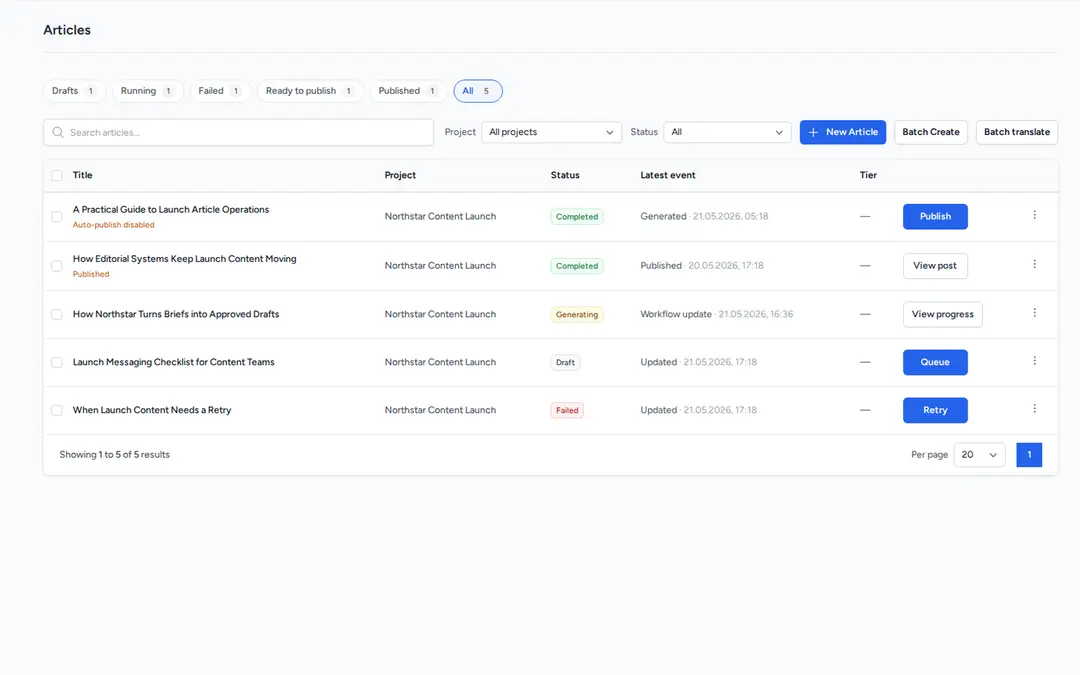
The Articles screen shows each piece with its outlet, status, owner, update date, and next action. Drafts don't disappear into a document folder or chat history.

Unspar article list

AI content production at the volume your team needs

Run content production on autopilot.

Unspar isn't built for one-off drafts. It runs a publishing pipeline from idea to live page, handling the work between each step.

An idea pipeline that refreshes itself

Unspar generates article ideas from your site, audience, competitors, and goals on a schedule. The list stays fresh and ready when you need it.

Batch creation and queue

Select several ideas and queue them. Unspar creates the drafts in parallel and adds the finished pieces to your review list. One trigger, multiple drafts.

Auto-publish when you approve

When you approve a draft, Unspar can publish it to your blog, CMS, or other configured outlet. Or download it in your preferred format and publish it yourself.

How content teams use Unspar

Three patterns we see most often. Each maps to a specific plan, so you can pick the one closest to your situation.

See pricing for all plans
2–4 pieces / month · Starter plan Founder or operator
4–10 pieces / month · Pro plan B2B marketing team
6–15 client brands · Scale plan Agency

Pricing

Plans for regular content production

Each plan includes credits for pieces of content. Shorter, simpler work uses fewer credits. Longer, research-heavy work uses more. Unspar shows the cost before a run starts.

For comparison: a freelance writer for one B2B blog post typically runs €200–500. Pro at €199/mo covers credits for fifty Standard pieces.

EUR USD

Starter

For regular content work

Solo operator or small business testing a steady content system.

€49/mo

50 monthly credits

  • 1 project or brand
  • 1 seat
  • 1 team voice profile
  • Templates, ideas, direct queue, and basic publishing handoff
  • Example: 10 Standard pieces
Start publishing

Pro

Best fit

For serious content teams

Founder-led marketing team, B2B site, or small content team.

€199/mo

250 monthly credits

  • 5 projects or brands
  • 5 seats
  • 5 team voice profiles
  • Bulk queue, system suggestions, publishing handoff, and bulk production
  • Example: 50 Standard pieces
Start publishing

Scale

For high-volume content work

Agency, multi-brand operator, or content team with larger monthly output.

€999/mo

2,000 monthly credits

  • 25 projects or brands
  • 15 seats, higher by agreement
  • 25 team voice profiles, higher by agreement
  • API access, bulk creation, and quoted project lane terms
  • Example: 50 Flagship pieces
Talk to us

Credits

The cost follows the work.

Small edits stay light. Source-backed reports get more research, citations, structure, and review. Unspar classifies each run from the settings you choose and shows the credit cost upfront.

Quick

1 credit

Small edits, short snippets, and simple rewrites.

Standard

5 credits

Normal drafts, rewrites, and everyday web content.

Advanced

15 credits

Longer work with research, sources, citations, voice, or extra polish.

Flagship

40 credits

Large, source-heavy work with detailed structure or several review steps.

Top-ups for busy months

Once you have a paid subscription, you can buy extra credits for tests, overage, or irregular spikes. Pack prices are the same on every plan, and purchased top-up credits expire after 12 months.

25 credits

€29

100 credits

€99

500 credits

€449

Concierge

Managed content operations

For customers who want our team to plan, create, review, and help publish content.

from €3,000/mo

  • Strategy intake and content plan
  • Briefs, setup, and content creation
  • Human editorial review and quality control
  • SEO/on-page checks and publishing support where access allows

Prices are shown before tax. EUR and USD prices are fixed launch prices, not live exchange-rate conversions.

Where to go from here

Start publishing

Create a draft from a title, brief, customer question, product note, or saved idea.

FAQ

Read about supported content types, templates, voices, outlets, quality, and pricing.

Contact

Ask about content scope, project setup, publishing channels, or a managed first rollout.

Start publishing your first Unspar draft

Bring a topic, a customer question, a product note, or a saved idea. Unspar shows the cost upfront, runs the editorial pipeline, and delivers a publish-ready draft. Auto-push it to your outlet, or review first.