
Credits, plans and billing
You pay for work in Unspar with credits. An ordinary article costs 1 credit, and a plan gives your team new credits every month.
All docs pages
A credit is what Unspar charges for work. Writing an article costs credits, and so do a few other tasks like generating images or finding article ideas. Unspar always shows you the price before anything starts.
Credits belong to your whole team rather than an individual account. Everyone on the team spends from the same shared balance. See Teams. Your plan adds credits each month, and you can buy credit packs whenever you need more.
What does an article cost?
Unspar sorts every article into a size class, and that class sets the price. You can see it before you start in the Estimated credits box on the Create page. If a setting bumps the article into a higher class, the box tells you which setting caused it.
| Class | Credits | With Check the facts | A typical article |
|---|---|---|---|
| Short text | 1 | 2 | A short post written without web research |
| Article | 1 | 2 | An ordinary article with web research, under 3,000 words |
| In-depth | 4 | 7 | A long guide, or an article with deep research |
| Report | 15 | 21 | A long guide with deep research, or a very long article |
| Project | Quote | Quote | Book-length work or a very large amount of source material |
Citations, quotes, and charts are included in the base price. Check the facts is an optional fact-check on the Create page, and Unspar charges its extra credits only when the check finishes. See Research, sources and citations.
Your planned length, research settings, and source material determine the class. Hitting any one of these thresholds moves the article into that class.
| What you set | In-depth from | Report from |
|---|---|---|
| Planned length | about 3,000 words | 7,500 words |
| Deep research | turned on | on 3,000 words or more |
| Source links | 3 | 8 |
| Uploaded files | 1 | 4 |
| Pasted text and uploads | 3,500 words | 9,000 words |
At 20,000 words, or 15,000 words of your own material, an article becomes a Project. Credits don’t cover Projects. Instead, the Create page shows Talk to us, and we’ll send you a quote. A refresh or a translation uses the same pricing and costs at least 1 credit.
What else costs credits?
A few other tasks have their own credit prices.
| What | Credits |
|---|---|
| An image Unspar makes for an article | 1 for each image you receive |
| A screenshot of a web page | 1 |
| A chart | 0, it is part of the article price |
| An idea run, or More ideas on a run | 1 |
| A voice built from your writing samples | 5 for each try |
| A round of changes to a finished article | The first successful round is free, then 1 |
You don’t pay for an image that fails to generate, which is why an article with images shows “up to” on its queue button. An idea run costs 1 credit even if it finds nothing new. Your team’s first voice built from a project’s website is free. See Images, Project Auto and ideas and Voices.
Estimates, drafts, downloads, and publishing are free.
When are credits held, charged and given back?
Unspar doesn’t charge you the moment you start an article. When you queue it, Unspar holds the credits for its price. Those held credits are set aside for that article and can’t be used for other work.
Once the article finishes, Unspar charges the held credits. If it fails or you cancel it, those credits return to your balance, though you’re still charged for any images you already received. Retrying an article holds the price again, and you only ever pay for the article once.
If your team doesn’t have enough available credits, the Create page says “Insufficient credits to queue this article.” and nothing starts. Credits held for running articles don’t count toward what’s available. A paid team with fewer than 5 credits sees Low credits at the top of the app.
Where do I see my credits?
The number in the top bar, such as “37 Credits”, shows what your team can spend right now. It leaves out held credits, though you can hover over the number to see them. Everyone on the team sees this balance.

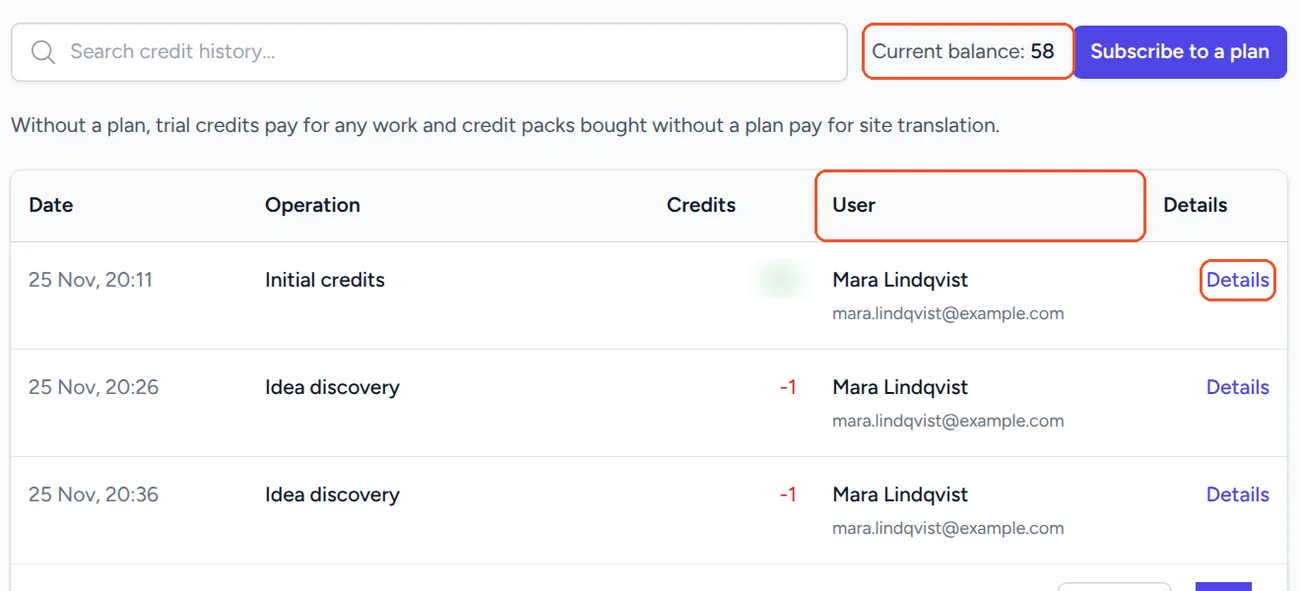
The team owner also sees a ? icon next to the number. Clicking it opens the Credits page, which is visible only to the team owner. There you’ll find the Current balance and a log of every credit added or charged, along with who started the job. Selecting Details on a row shows the article it was for.
What do the plans cost?
Every new account starts on the Free plan. After a quick check, new accounts can claim 10 free credits once, and those credits last 30 days. To keep writing after that, you’ll need a paid plan.
| Plan | Price a month | Credits | Unused credits roll over up to | One ordinary article |
|---|---|---|---|---|
| Free | €0 | 10 once, for 30 days | No rollover | 1 free credit |
| Starter | €49 or $59 | 50 each month | 150 | about €0.98 or $1.18 |
| Pro | €199 or $239 | 250 each month | 750 | about €0.80 or $0.96 |
Every plan includes all features, with no limits on projects, people, or voices. Plans are billed monthly. Prices are listed before tax, and the checkout displays the final total. See the pricing page for a full overview.
Unspar adds your monthly credits on the same day each month, based on when your plan started. Free credits and credit packs don’t count toward the rollover cap, and Unspar always spends the credits that expire soonest first.
Subscribe to a plan
Only the team owner can subscribe. Billing appears in the user menu only when you’re in a team you own.
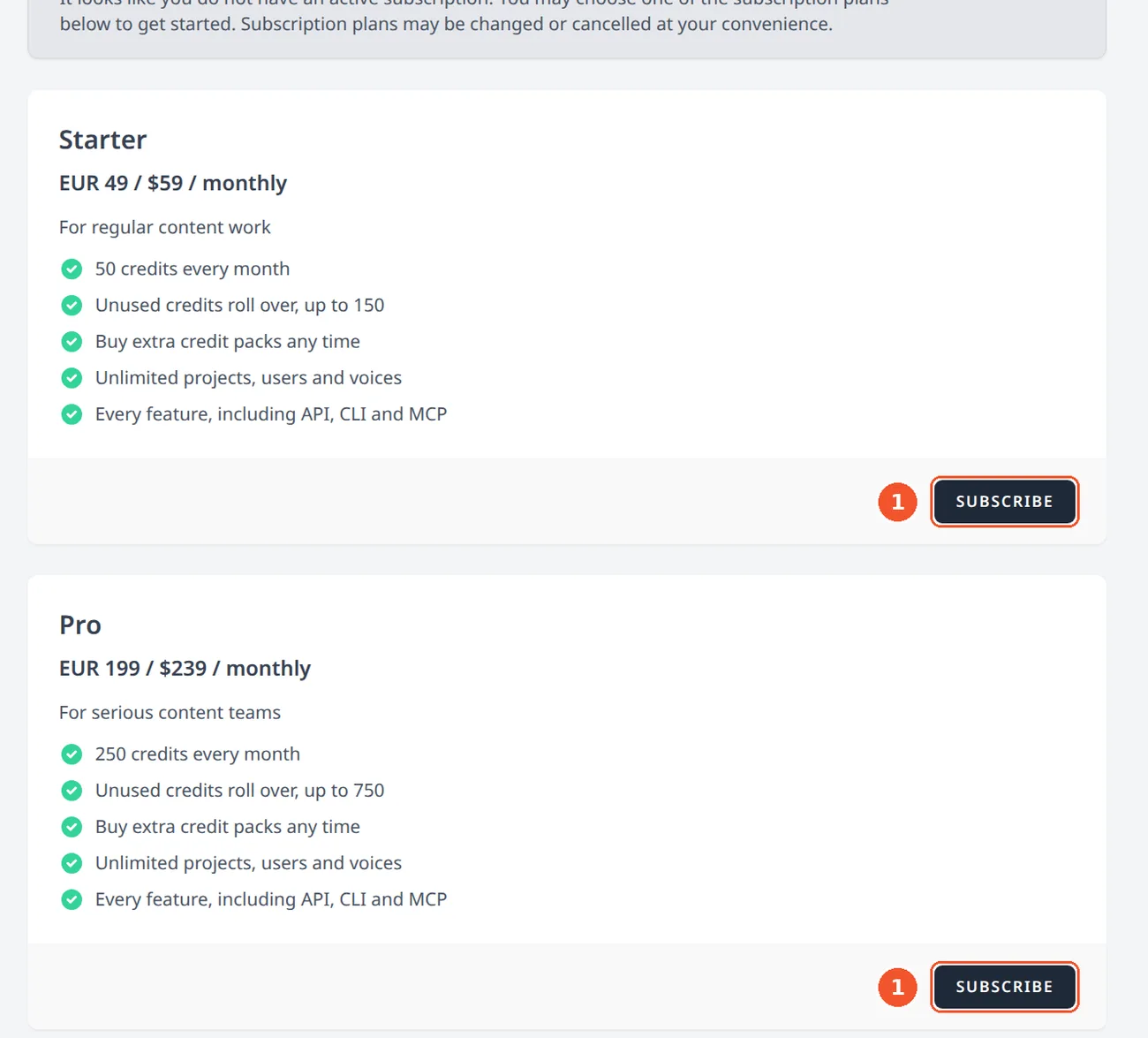
- Open the user menu at the top right and choose Manage subscription under Billing. The Billing page opens.
- Choose Subscribe under Starter or Pro.
- Pay in the checkout window. It comes from Paddle, the company that handles our payments and invoices.
The page shows Subscription Pending for a few seconds before displaying your plan. Your first monthly credits arrive right away. Any free credits you still have remain in your balance, and Unspar spends them first.
Buy a credit pack
A credit pack is a one-time bundle of extra credits. Only the team owner can buy one, and your team must be on a paid plan.
| Pack | Price |
|---|---|
| 25 credits | €29 or $35 |
| 100 credits | €99 or $119 |
| 500 credits | €449 or $549 |
- Open Buy credits. In the user menu, it’s Purchase credits under Billing.
- Choose Purchase credits on the pack you want.
- Pay in the Paddle checkout.
Unspar displays Confirming your payment for a few seconds, and then the credits appear on your team. A pack stays valid for 12 months and works only while your plan is active.
Change or cancel your plan
You can switch between Starter and Pro at any time from the Billing page.
- Choose Change Subscription Plan.
- Choose Subscribe under the other plan.
- Choose Confirm.
Paddle settles the price difference right away. If you upgrade, your 250 Pro credits arrive on your next monthly billing date, so buy a credit pack if you need more credits today. If you downgrade, Unspar immediately trims any plan credits above 150 down to 150.
To cancel, choose Cancel Subscription and confirm. Your plan stays active until the end of the billing period you already paid for. Until then, you can undo the cancellation with Resume Subscription.
Once the plan ends, your team loses all unused credits, including credit packs and free credits, and they can’t be restored. Any articles already in progress still finish and are charged, and your projects and articles remain in your account.
If a payment fails, the Billing page shows Failed Subscription Payment. Choose Update Payment Method to fix it. Until the payment goes through, your team can’t spend plan or pack credits. You can find your invoices under Invoices on the same page, and refunds follow our refund policy.
For AI agents
Check the balance and the estimate before you create an article. The estimate creates nothing and holds no credits. unspar articles create and unspar articles queue ask for confirmation unless you pass --force. The raw unspar api post sends without asking. The team owner handles the plan and the invoices in the web app. An agent can read the plan and the balance but can't change them.
unspar credits balance
unspar credits transactions --since 2026-11-01T00:00:00Z
unspar api post /articles/estimate --field project=<project-id> --field "brief=How to fix a flat bike tyre"
unspar articles create --project <project-id> --brief "How to fix a flat bike tyre" --no-queue
unspar articles queue <article-id>
unspar whoami
unspar credits balance --json
unspar <command> --help lists each command's flags and output options. Install and login: the CLI docs.
Last updated 25 November 2026. This page as Markdown: credits-and-prices.md
Try Unspar for free
Create a project, give it a topic and read the article before anything goes live.