
Sites in several languages
Unspar translates your finished articles into the other languages of your site. When a country needs different facts, it writes a new article in that language instead.
All docs pages
When you run a site in several languages, you need each post in every language you publish. Unspar can translate a finished post using a template that controls how freely it rewords the text. If a post needs different facts for another country, Unspar can write a new article in that language and research it locally.
Which languages can Unspar write in?
Unspar writes and translates in four languages, each with a few regional variants. It doesn’t support any other languages.
| Language | Regional variants |
|---|---|
| English | US, UK, Australia, Canada |
| German | Germany, Austria, Switzerland |
| Spanish | Spain, Mexico, Argentina |
| French | France, Canada, Belgium, Switzerland |
Set up a project for each language
A project is one website, or one part of it, with its own settings and articles. Give each language its own project.
- Open Projects and choose New project.
- Set Default article language to the language and variant, then choose Create project. The new project opens.
- In the project’s More actions menu (⋮), choose Edit.
- Write a Site context for readers in that country, like this:
Guides for parents in the UK who buy wooden toys for small children. Prices are in pounds, and orders ship from Germany. Where UK rules differ from German ones, articles follow the UK rules.
- In a German or French project, set Form of address to Formal or Informal.
- Choose Save.
For an informal German project, the built-in voice Freundlicher Du-Blog writes approachable everyday help. See Projects and site context and Voices.
Translate or write new?
A translation carries over what the original says and does no research. That works well for a post that stays the same in every country, like how to care for a product. If a post needs local facts, like regulations in another country, write a new article in that language’s project so Unspar researches it for that country.
There are five translation templates. Natural translation stays close to the original and reads like a native speaker wrote it. Localized translation also adapts idioms and examples for the new audience. All five templates are marked Experimental, meaning they haven’t passed a review for their use case yet. Have someone who speaks the language read each translation before you publish it. See Choosing a template.
Translate one post
- On the Create page, open the Manual tab. Pick the target language’s project and set Creation mode to Translate existing content.
- Under Template, pick Natural translation.
- Under Source content, choose URL, enter the address of the original post, and choose Extract source.
- Check the Target language, and set Formality if the language has it.
- Check Estimated credits and choose Queue article.
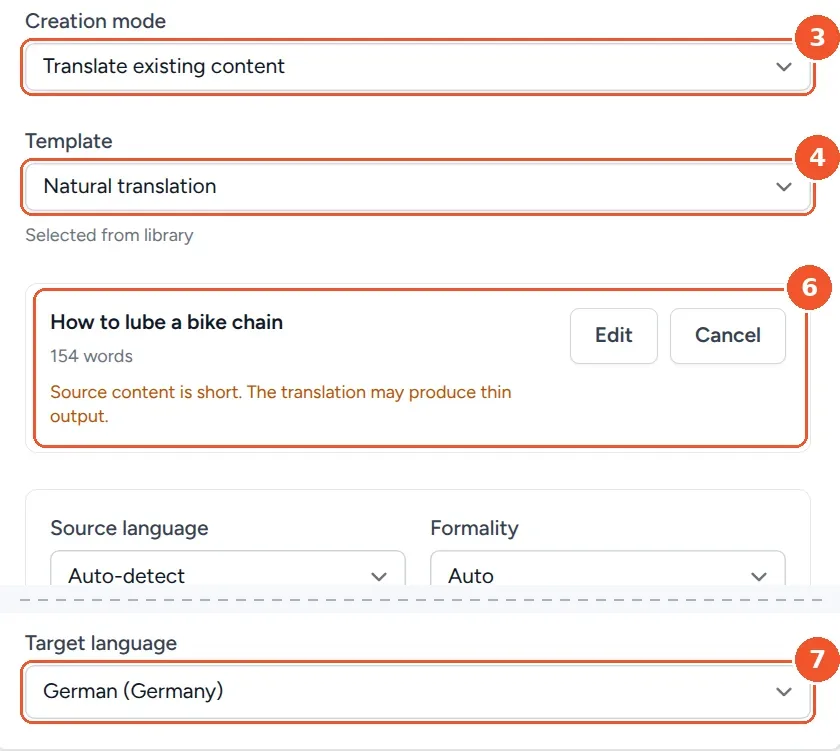
If the original isn’t on your site yet, copy its text from the Markdown tab on its article page. Under Source content, choose Paste and then Use source. You can only start translations in the web app. See Translations.
To translate several posts at once, open the Batch tab and choose Translate source articles. Each batch belongs to one project, so run one batch per language.
Publish each language
An outlet is a site Unspar publishes to. If each language lives on its own site, connect each one under Outlets and set it as the Default outlet for that language’s project.
Unspar doesn’t tell WordPress which language a post is in, and it doesn’t link a translation to its original. If you use a translation plugin to run all languages on one site, set the outlet’s Default status to Draft. Each post will wait in WordPress so you can set its language in the plugin before publishing. See WordPress.
Links in a translation still point to the original URLs, so update them to pages in the new language. Translations don’t create new images, and if you edit the original later, Unspar won’t update the translations.
What it costs
Translating an ordinary post costs 1 credit. A long post, starting around 3,500 words, costs at least 4 credits. Four new posts a month, each translated into two more languages, come to 12 credits. Starter costs €49 a month and includes 50 credits. See Credits and prices.
If a translation sounds stiff in places, choose Request changes on its page. The first round is free.
Last updated 25 November 2026. This page as Markdown: multilingual-sites.md
Try Unspar for free
Create a project, give it a topic and read the article before anything goes live.