# Webhooks
A webhook outlet sends each article you publish to an address on your own server, as signed JSON. Your code decides what happens with it, for example saving it to your database.
Web version: https://www.unspar.com/docs/guides/webhooks/
A webhook is the outlet for sites that Unspar can't publish to directly. An outlet is where Unspar sends finished articles. With a webhook, that destination is an endpoint on your own server that receives the article and stores it wherever your site needs it. [Outlets and publishing](https://www.unspar.com/docs/guides/outlets-and-publishing/) explains outlets in general.
Use a webhook when your site reads its posts from a database, or when it runs on a system that isn't WordPress, Ghost, or GitHub. Someone has to write the endpoint. This page has what they need.
## Set up a webhook outlet
The webhook needs a signing secret. That's a long, random string that only Unspar and your server know. Unspar uses it to sign each request so your server can verify it came from Unspar.
1. Make a signing secret. In a terminal, `openssl rand -hex 32` generates one. Store it in your server's configuration.
2. Open [Outlets](https://app.unspar.com/outlets) and choose **New outlet**.
3. Choose the **Webhook** card.
4. Under **HTTPS endpoint**, enter your endpoint, like `https://example.com/unspar/articles`.
5. Paste the secret into **Signing secret**.
6. Give the outlet a **Name**, choose **Test connection**, and then **Create outlet**.
The test checks the address format and confirms that the domain exists. It doesn't send a request to your server, so publish an article to test your endpoint.
The endpoint must use HTTPS on port 443 or 8443. It needs a domain name instead of an IP address, and it must be reachable from the internet. Otherwise Unspar says "Use a public HTTPS endpoint. Private, local and reserved addresses are blocked." Unspar doesn't follow redirects, so the endpoint has to answer at the exact address you entered.
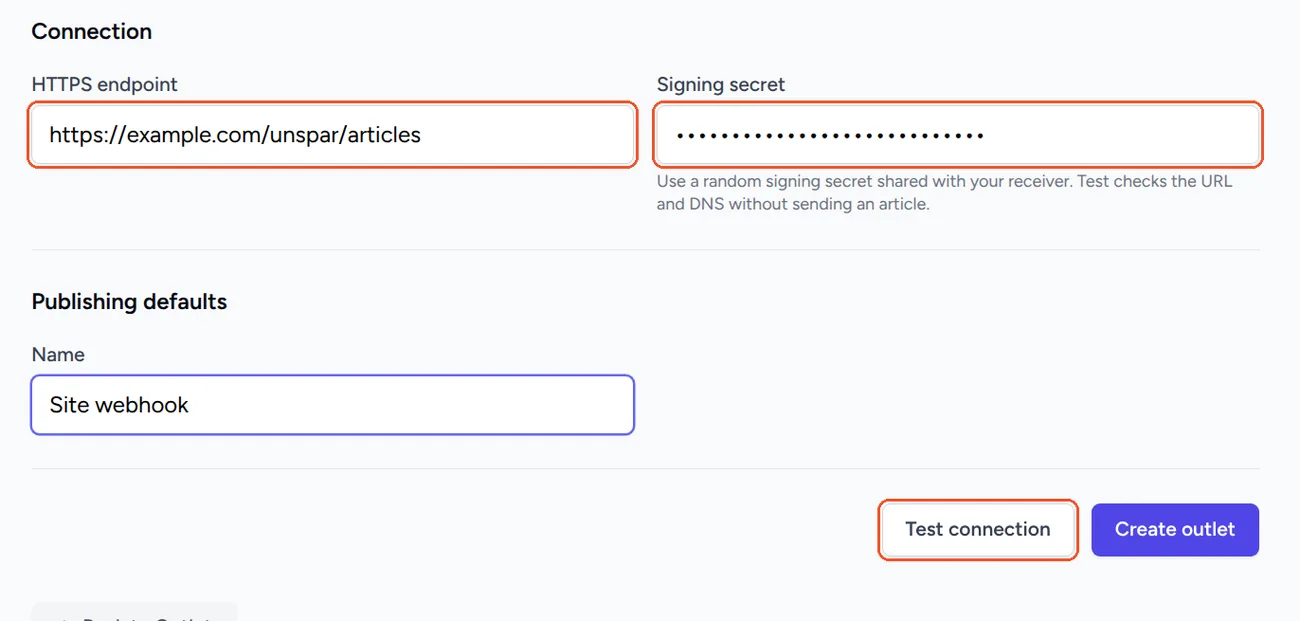
Enter your endpoint and the signing secret your server also knows.
## What does Unspar send?
When you publish, Unspar sends a POST request with a JSON body like this:
```json
{
"version": 1,
"delivery_id": "01JXB4R7T2W9Y3Z6A8C1E5G0HK",
"type": "article.publish_requested",
"timestamp": 1795593600,
"article": {
"id": "01JX9Q3M4N5P6R7S8T9V0W1X2Y",
"project_id": "01JX7K2P3Q4R5S6T7V8W9X0Y1Z",
"title": "How to restore one table from a pg_dump backup",
"description": "Restore a single table from a full pg_dump file.",
"slug": "restore-one-table",
"language": "en-US",
"date": "2026-11-24T14:12:09+00:00",
"tags": ["postgres", "backups"],
"markdown": "A full pg_dump file holds every table ...",
"html": "A full pg_dump file holds every table ...
",
"featured_image_url": "https://app.unspar.com/content-media/...",
"images": [
{
"url": "https://app.unspar.com/content-media/...",
"alt_text": "A terminal running pg_restore",
"caption": null
}
]
}
}
```
`markdown` and `html` hold the same text. The featured image isn't in the text. Its address is in `featured_image_url`, which is `null` when there is none. `date` is when Unspar finished the article, not when you published it. `article.id` stays the same if the article reaches you again.
The images stay on Unspar's server, so their URLs stop working if you delete the article in Unspar. Copy the images to your own storage if you don't want your site to depend on Unspar.
The request also carries these headers:
| Header | Value |
| ---------------------- | ------------------------------------------ |
| `X-Unspar-Delivery-Id` | The same as `delivery_id` |
| `X-Unspar-Timestamp` | The time of sending, in seconds since 1970 |
| `X-Unspar-Signature` | `v1=` followed by the signature as hex |
## Check the signature
The signature proves that the request was signed with your secret and wasn't modified in transit. Unspar computes an HMAC-SHA256 over the timestamp, a period, and the request body. Your server computes the same hash with its copy of the secret and compares the two.
Use the raw body exactly as it arrived. If you parse the JSON and serialize it again, the signature won't match. You should also reject timestamps older than five minutes. Here is the check in Node, with no extra packages:
```js
import { createHmac, timingSafeEqual } from "node:crypto";
function signatureIsValid(rawBody, timestamp, signature, secret) {
if (!/^\d+$/.test(timestamp ?? "")) return false;
if (Math.abs(Date.now() / 1000 - Number(timestamp)) > 300) return false;
if (!/^v1=[0-9a-f]{64}$/.test(signature ?? "")) return false;
const expected = createHmac("sha256", secret)
.update(timestamp + ".")
.update(rawBody)
.digest();
return timingSafeEqual(Buffer.from(signature.slice(3), "hex"), expected);
}
```
Call it with the raw body as a Buffer and the values of the `X-Unspar-Timestamp` and `X-Unspar-Signature` headers. In Express, read the body for this route with `express.raw({ type: "application/json" })`.
## What should your server answer?
Answer with a status code in the 200s once you have saved the article. Unspar then marks the article as published.
Unspar waits up to 10 seconds for a response. Save the article and reply right away, then handle slower work like rebuilding pages afterward.
If the connection fails, or your server returns 408, 429, or a code in the 500s, Unspar retries right away, up to three attempts in total. Any other response fails immediately with a message like "Webhook delivery failed (HTTP 401)."
After the last attempt, the article shows "Publish failed" and Unspar won't retry on its own. Once your endpoint is working, open the article and publish it again.
The same article can arrive more than once, such as when your server saves it but responds too late. Use `article.id` to spot duplicates and return 200 again.
Unspar sends only this one event, `article.publish_requested`. It doesn't call your endpoint when an article changes or is deleted.
## Create the outlet from the terminal
You can also create the outlet with the [unspar CLI](https://www.unspar.com/docs/cli/). Write the settings into a file like `webhook-outlet.json`:
```json
{
"name": "Help center",
"type": "webhook",
"connection": { "api_url": "https://example.com/unspar/articles" },
"credentials": { "api_key": "" }
}
```
Then create the outlet:
```sh
unspar api post /outlets --body-file webhook-outlet.json --secret-field api_key
```
`--secret-field api_key` hides the secret in the CLI's output. The file still holds it in plain text, so delete the file afterward and never commit it. The [API reference for outlets](https://www.unspar.com/docs/api/outlets/) lists all fields.
## For AI agents
An agent can create a webhook outlet from the terminal with the api command. Put the signing secret in a protected file and pass --secret-field api_key, so the secret never shows in the output. Delete the file afterwards. Publishing asks for confirmation unless you pass --force.
```sh
unspar api post /outlets --body-file webhook-outlet.json --secret-field api_key
unspar api post /outlets//test
unspar articles publish --outlet
unspar api get /articles//publishing-attempts
```